Dressmaker Sewing Controls: Keys, Thread & Assist
Dressmaker sewing controls explained from official screenshots: Space, A/D and W/S prompts, spool colour selection, and separately labelled assist tips.
Official facts and community observations labelled separately. Reviewed 9 October 2026.
How do you change the thread colour?
Build 410 documents clicking the thread spools in the sewing scene. A separate player guide shows the same interaction. The official patch confirms colour selection; it does not say a particular thread colour increases quality.
Which assist options do players report?
The completionist guide describes Sewing Assist in Options and a selectable sewing speed. Players still advise slowing around sharp corners. The tutorial guide reports R resets the current sewing piece. These are community-reported controls, not our hands-on verification.
| Feature | Evidence |
|---|---|
| Thread spools | Official Build 410 patch |
| Sewing Assist | Player completionist guide |
| Current-piece reset with R | Player tutorial guide |
How do you read this screen?
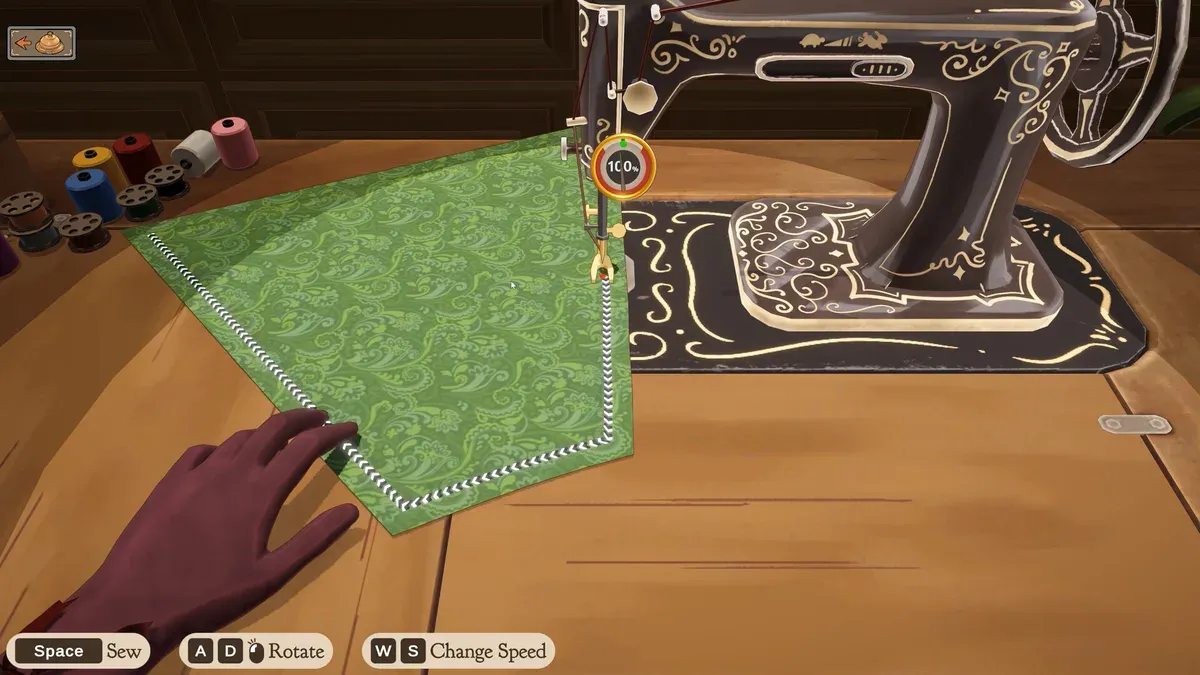
Official Steam promotional screenshot, with editorial markers. Its values illustrate the interface; they are not your save or a current-build playtest.
- 1Spools on the left: Build 410 documents clicking them to change thread colour.
- 2Needle and route: follow the visible path on the current panel.
- 3Bottom prompts identify Sew, Rotate and Change Speed controls.
Which controls are visible in the official screenshot?
| Prompt | Meaning | Check before use |
|---|---|---|
| Space — Sew | Sew the current seam | Compare your on-screen hint |
| A / D and a mouse symbol — Rotate | Rotate fabric | The symbol alone does not establish the exact mouse input |
| W / S — Change Speed | Adjust speed | Watch the current speed display |
These are readable official screenshot prompts, not a complete keyboard or controller test for every platform. Follow your current interface when it differs.
How do you practise one inspectable seam?
- Choose a panel whose route is easy to see and locate rotation and speed prompts.
- Use the current Sew control and slow down before a difficult turn if needed.
- Inspect the needle position after turning.
- Before restarting, check tutorial hints. A community guide reports R for the current sewing attempt; it is not evidence of a whole-dress undo.
- Note the troublesome seam, then compare another attempt with the quality checklist.
Are thread colour, assist and speed the same feature?
No. Spool selection is an official colour feature; Sewing Assist is described by players; W/S is a speed prompt in the screenshot. A colour option does not establish a quality bonus. A player account also does not establish that assist has identical scoring consequences in every build.
What is a useful practice configuration?
Use a comfortable speed and a seam you can follow. If control prompts differ from this table, follow your installed build. Keep the thread visually distinguishable from the fabric if that helps you read the path; this is a visibility suggestion rather than a scoring rule.
What should you read next?
- Sewing guide: a calm practice routine
- 100% quality: diagnose the stage that lost points
- Build 410 patch: sketchbook, spools and panel hints
Sources and evidence
- Official Build 410 patch
- bundrop — player thread-colour guide
- chaseit — player completionist guide
- dreamcatcheross — player tutorial
Player observations should be checked against your installed build. Editorial checklists are not guarantees of perfect scores or universal unlock behaviour.
Screenshot evidence: official Steam product media, Cozy Lives / Free Lives.
Related Articles
achievements
Dressmaker Achievements: All 32 Names & Conditions
All 32 Dressmaker Steam achievements: official names, visible conditions, hidden entries and a completion checklist for quality, commissions, cost and trim.
achievements
Dressmaker Completionist plan and the missable dialogue warning
Plan Dressmaker achievement attempts around official thresholds, then inspect a spoiler-labelled community warning about a potentially missable dialogue choice.
characters
Dressmaker Customer Preferences & Measurements: All 10
Dressmaker preferences for all 10 customers, with spoiler-labelled styles, colours, fabrics and community measurements, plus advice for checking each brief.
Was this helpful?
Thanks for the feedback!