Dressmaker Dress history and sharing a finished creation
Find the notebook history described by players and use a careful sharing workflow without confusing thumbnails, full images and save files.
Community report, not hands-on verified by this wiki. Reviewed 9 October 2026.
How do you read this screen?
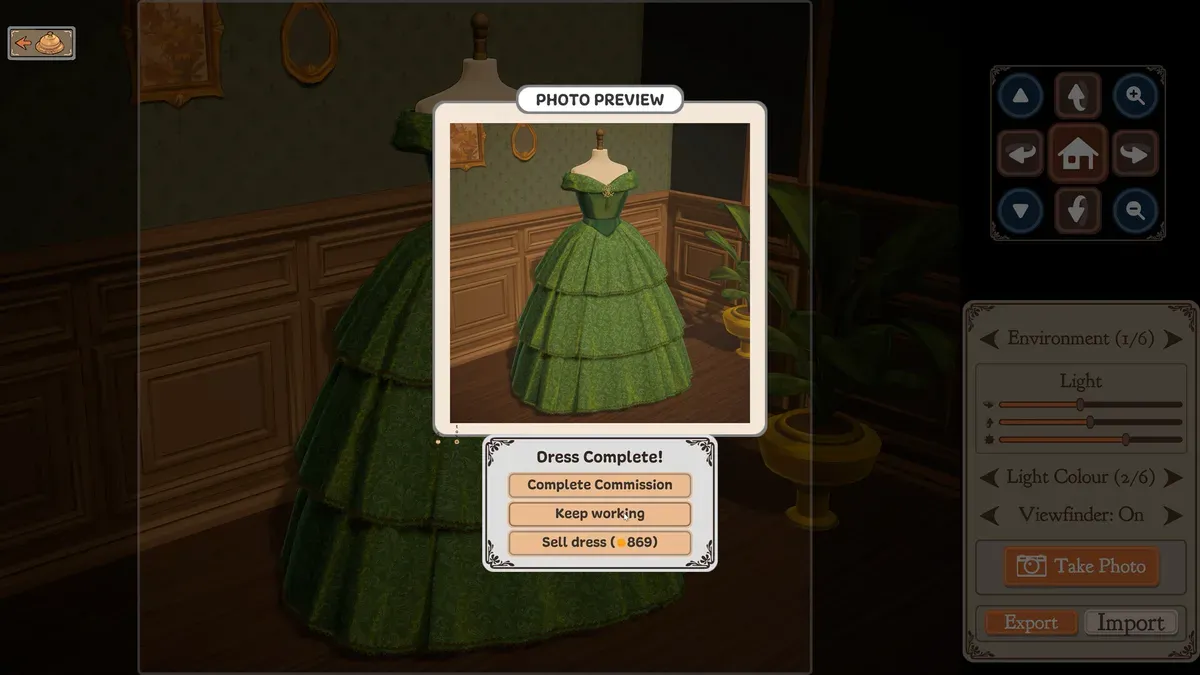
Official Steam promotional screenshot, with editorial markers. Its values illustrate the interface; they are not your save or a current-build playtest.
- 1Complete Commission: the hand-in option.
- 2Keep working: continue the current garment.
- 3Sell dress: a sale option; 869 is the screenshot’s example value.
What can this completion screenshot establish?
It shows Take Photo, Export, Import, a photo preview and three garment actions. It establishes interface entry points, not a universal file format, save location or complete meaning of Import. A button label is not evidence of a save-game import feature.
Where do players find old dresses?
In the Steam discussion, a player describes flipping backward through notebook pages and selecting the character name above friendship stars. An off-the-rack history entry is also mentioned. These are community navigation tips, not a verified filesystem location.
Are thumbnails the same as exported pictures?
The question that began the discussion mentions finding thumbnails but not full-size images. We therefore do not infer an export folder from that post. A small preview, a save record and a full-resolution picture are different artifacts.
How can you share a creation carefully?
Use your normal screenshot capture tool if the game does not clearly offer export. Crop to the dress, keep a full view and a detail view, and credit the game when sharing. Do not upload a save or diagnostic bundle just to show a dress.
A useful showcase caption is the design idea, the two choices you are happiest with, and one technique you want to improve. This is our suggested presentation method.
What should you read next?
- Sketchbook, pattern selection and design planning
- Buttons, bows and trims: plan your finishing pass
- Troubleshooting and reporting a useful bug
Sources and evidence
Player observations should be checked against your installed build. Editorial checklists are not guarantees of perfect scores or universal unlock behaviour.
Screenshot evidence: official Steam product media, Cozy Lives / Free Lives.
Related Articles
achievements
Dressmaker Achievements: All 32 Names & Conditions
All 32 Dressmaker Steam achievements: official names, visible conditions, hidden entries and a completion checklist for quality, commissions, cost and trim.
achievements
Dressmaker Completionist plan and the missable dialogue warning
Plan Dressmaker achievement attempts around official thresholds, then inspect a spoiler-labelled community warning about a potentially missable dialogue choice.
characters
Dressmaker Customer Preferences & Measurements: All 10
Dressmaker preferences for all 10 customers, with spoiler-labelled styles, colours, fabrics and community measurements, plus advice for checking each brief.
Was this helpful?
Thanks for the feedback!